
ITVD Indoor Virtual Display
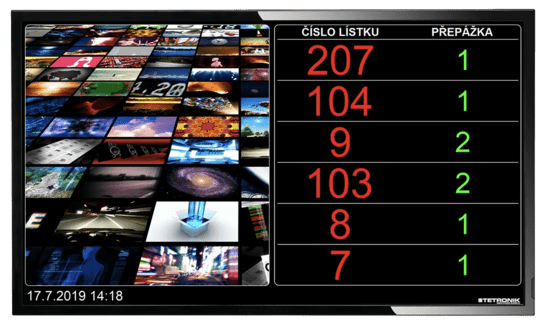
Technical Specifications:
- Power Supply: 230 V AC
- Communication: Connects to a PC via HDMI
- Recommended screen size: Diagonal in inches (32 to 50”)
- Operating temperature range: -5°C to +40°C
- Control software: QTronik, QTir
User parameters:
- An alternative to traditional LED or dot-matrix displays—LCD or LFD displays.
- Ability to display information about the numbers of calling clients and other user-defined information.
- Suitable for displaying videos, image presentations, advertisements, or institutional promotions.
- Rental of advertising space to third parties for commercial purposes.
- Ability to display text information, preset or real-time information from service counters.
- The display is controlled by a separate computer that communicates with the call system via a LAN network.
- Support for the QVOICE module for voice-based client calls along with visual information.
- Announcements in the format “Client number xxx to counter yy,” with the option to customize as needed.
- The QVOICE module makes it easier for blind or visually impaired visitors to use the system.
- LCD display connected to the control computer via a VGA or DVI cable.
- Standard screen split (50% call system, 50% video presentation) with the option to customize according to requirements.
QDMP1 Matrix Partition Display
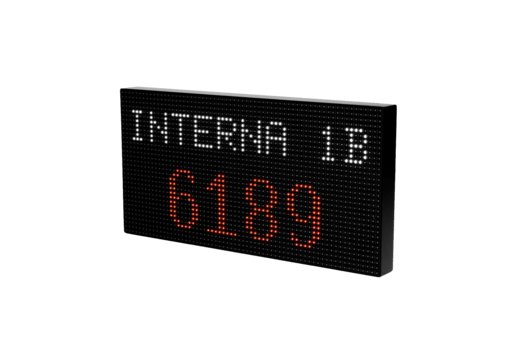
Technical Specifications:
- Power Supply: 24 V DC
- Power consumption: 20 W
- POE: IEEE 802.3at/af
- Protection rating: IP 30
- Communication: Ethernet, TCP/IP (RJ45)
- Weight: 3 kg
- Display: Static/dynamic alphanumeric characters in predefined fields
- Operating temperature: +5°C to +40°C
- Dimensions: 160x320x28
- Control software: QTronik, QTir, QTime
User Parameters:
- Matrix display for actively displaying information using various alphanumeric characters.
- Capable of displaying the service counter designation, client number, additional text, and other information.
- Displays are installed at the counter, above the door, or on the desk according to customer requirements
- Displays static or scrolling text, as well as the current date and time.
- Option to set the RGB display color according to user preferences.
- Integration with external systems and customizable display settings.
- They allow for flexibility during organizational changes, where only the workstation number changes.
- If a workstation is not in use, the display remains off, preventing confusion.
- Displays the workstation number along with the client’s queue number for better orientation.
- Counter displays show the number of the client currently being called at the service station.
QDMH3 Indoor Matrix Display
Technical Specifications:
- Power Supply: 24 V DC
- Power consumption: 60 W
- POE: IEEE 802.3at
- Protection rating: IP 30
- Communication: Ethernet, TCP/IP (RJ45)
- Weight: 4 kg
- Display: Static/dynamic alphanumeric characters in predefined fields
- Operating temperature: +5°C to +40°C
- Dimensions: 320x480x28
- Control software: QTronik, QTir, QTime
User settings:
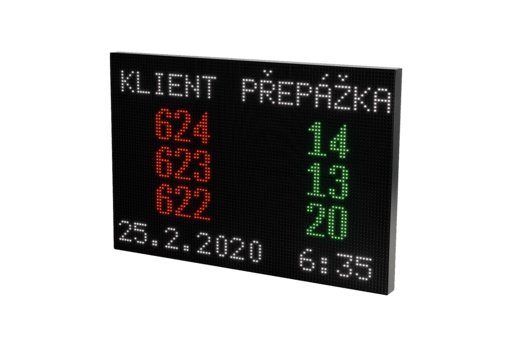
- Display designed to show client and counter numbers.
- Capable of displaying a client number up to 4 digits long and a counter number up to 3 digits long.
- The DMD display variant allows for the display of directional arrows indicating the direction to the check-in counter.
- Capable of displaying informational text on the bottom line of the display, including the current date and time.
- The lobby display is located in the waiting area to ensure maximum visibility.
- Option to install multiple lobby displays in larger institutions.
- Each lobby display can show only the clients being called in its section of the system, which is useful in multi-story buildings.
- The lobby display has multiple lines, with the most recently called client shown on the first line.
- The client’s number and the extension number of the workstation calling them flash on the display.
- As the next client is called, the previous clients move down one line.
- Option to set the RGB color display for each section of the display